What is payment reconciliation?
Payment reconciliation is the process of confirming that your business’s internal payment records align with external bank statements, payment processor files, and general ledger entries. When all three sources agree on a transaction, it is reconciled. When they don’t, you have an exception that requires investigation before the period closes.
At its core, the process performs a three-way verification: the internal accounts payable or card ledger, the external statement confirming the payment cleared, and the GL entry posted to your ERP. A transaction is only fully reconciled when all three match. This structure is what makes payment reconciliation distinct from a simple bank statement review.
Finance teams typically run two parallel workflows. One workflow handles AP-payment reconciliation covering the invoice side, matching vendor invoices to payments and confirming clearance through the bank file. Another workflow manages card-spend reconciliation covering corporate card activity, aligning each transaction to a coded GL entry and the card issuer’s statement. Both workflows converge on the general ledger, but they touch different systems and surface different exceptions.
The key components of payment reconciliation include:
- Internal records: Journal entries, AP ledger data, and ERP transaction logs
- External statements: Bank files, wire confirmations, card-program files, and vendor statements
- General ledger entries: Posted GL transactions that must match both internal and external records
- Exception management: Identifying, investigating, and resolving unmatched or mismatched transactions
- Audit trail: Documented evidence of every match, adjustment, and resolution decision
Why payment reconciliation matters for financial accuracy and risk management
Accurate payment reconciliation gives finance decision-makers a verified picture of cash position, not an estimated one. Without it, your cash balance reflects what was recorded, not what actually cleared, and those two figures can diverge quickly in a high-volume environment.
The risk exposure from skipping or delaying reconciliation is concrete. Duplicate payments to vendors, missed incoming payments, and fraudulent transactions can all sit undetected until they distort your financial statements. Reconciliation catches these issues before they reach the books.
Compliance is another direct consequence. Regulatory compliance and audit readiness both depend on documented reconciliation records. Auditors expect to see a clear trail showing that every material transaction was verified, matched, and signed off. Businesses without that trail face delays, findings, and potential penalties.
The broader benefits for finance teams include:
- Cash flow visibility: Confirmed cleared payments give you a reliable cash balance for budgeting and forecasting
- Fraud detection: Unmatched transactions surface anomalies that warrant investigation before they compound
- Duplicate payment prevention: Matching against bank files catches payments processed twice before vendor statements arrive
- Period close efficiency: Regular reconciliation reduces the exception backlog at month-end, compressing close timelines
- Strategic decision support: A rigorous reconciliation process supports accurate forecasting and growth planning by ensuring the underlying data is trustworthy
How the payment reconciliation process works, step by step
The payment reconciliation process follows a structured sequence. Skipping or rushing any step pushes exceptions into the next period, where they become harder to trace.
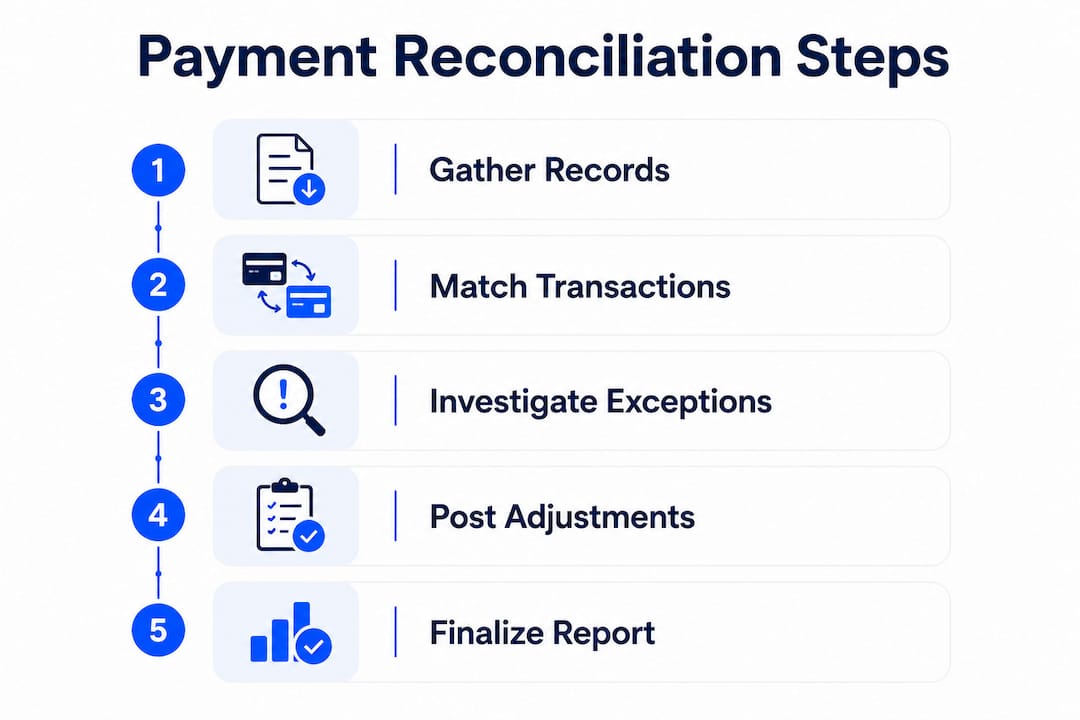
Step 1: Gather records

Collect all internal transaction records for the period, including AP ledger exports, card transaction logs, and journal entries. Pull the corresponding external statements: bank files, wire confirmations, card-program files, and any vendor statements. Extract the specific fields needed for matching, typically transaction amount, date, reference number, and counterparty.
Step 2: Match transactions
Compare each internal record against its external counterpart. Matching criteria include:
- Transaction amount
- Settlement date
- Reference or invoice number
- Counterparty name or account identifier
Transactions that match on all criteria are cleared from further review. Those that don’t match move to the exception queue.
Step 3: Investigate exceptions
Every unmatched transaction needs a root cause. Common causes include timing differences (a payment initiated before period-end that cleared after), data entry errors, duplicate postings, and genuinely missing or fraudulent transactions. Each exception should be documented with the reason identified and the resolution action taken.
Step 4: Post adjustments and journal entries

Once exceptions are resolved, post the necessary correcting journal entries to the general ledger. This may include reversing duplicates, recording bank fees not captured in the AP ledger, or recognizing FX gains and losses on cross-border payments.
Step 5: Finalize and document
Generate a formal reconciliation report summarizing the period, the total transactions matched, exceptions identified, and adjustments made. This report is your audit trail. It confirms the accounts are balanced and provides the evidence auditors and regulators need to verify your financial statements.
Types of payment reconciliation and when each applies
Payment reconciliation is not a single workflow. Different payment types carry different risks and require different data sources.
Bank reconciliation is the most familiar subset. It matches the bank statement against the GL cash account, confirming that every debit and credit in the bank file has a corresponding ledger entry. It does not cover vendor invoices or card transactions directly.
AP-payment reconciliation goes further. It matches a vendor invoice to its payment, confirms the payment cleared in the bank file, and verifies the GL posting in the ERP. This workflow runs on the AP side of the business and is where three-way matching (purchase order, invoice, receipt) serves as the precondition before payment goes out. Reconciliation is what happens after that match is paid and lands in the bank file.
Card-spend reconciliation aligns each corporate card transaction to a coded GL entry, a receipt where required by policy, and the card issuer’s statement. The data sources, exception types, and approval workflows differ from AP reconciliation, which is why treating them as distinct processes improves both clarity and control.
Multi-currency and FX reconciliation applies to businesses with cross-border payment flows. Foreign exchange variances between the rate at payment initiation and the rate at settlement are normal. These should be recorded as FX gains or losses in the GL, not flagged as payment errors. Misclassifying FX variances as discrepancies inflates your exception queue and distorts your P&L.
Best practices for effective payment reconciliation
The single most impactful change most finance teams can make is shifting from month-end reconciliation to a daily or weekly cadence. Reconciling close to the transaction date makes exceptions easier to trace and eliminates the backlog that slows period close.
Effective reconciliation also depends on documentation at every stage. Recording why a discrepancy occurred and what action resolved it builds the audit trail that auditors and regulators require. A reconciliation without documented exception resolution is incomplete, regardless of whether the numbers balance.
Key practices to implement:
- Reconcile frequently: Daily or weekly cycles reduce exception volume and improve period close speed
- Separate AP and card workflows: Different data sources and exception types warrant distinct processes and ownership
- Automate matching: Manual reconciliation introduces human error and slows as transaction volumes grow; automated matching flags exceptions for human review rather than requiring humans to find them
- Handle FX variances correctly: Record currency fluctuations as FX gains or losses, not unresolved discrepancies
- Maintain a complete audit trail: Document every exception, its root cause, and the resolution taken
Pro Tip: Integrate reconciliation checks into your payment approval workflow, not just at period close. Catching a mismatch before a payment is released is faster and cheaper than resolving it after the funds have moved.
Tools and software used for payment reconciliation
Finance teams have a range of software options for managing the reconciliation process, from ERP-native modules to dedicated reconciliation platforms.
ERP systems such as Oracle NetSuite, SAP, and Microsoft Dynamics include built-in reconciliation modules that connect the AP ledger, GL, and bank feed within a single system of record. For businesses already running these platforms, native reconciliation tools reduce the need for data exports and manual file matching.
Dedicated reconciliation platforms sit between your ERP and your bank or payment processor, automating the matching logic and surfacing exceptions in a structured queue. These tools are particularly useful for high-volume environments where transaction counts make manual matching impractical.
Accounting software such as QuickBooks and Xero includes bank reconciliation features suited to smaller businesses and SMEs. These platforms connect directly to bank feeds and flag unmatched transactions, though they typically handle bank reconciliation rather than the full AP-payment workflow.
Payment infrastructure platforms that provide structured transaction data, consistent reference numbers, and clean bank file exports make reconciliation significantly faster. When your payment data arrives in a standardized format with reliable identifiers, matching rates improve and exception queues shrink. Demivolt’s payment workflow tools are designed with this in mind, giving finance teams the clean, structured data that reconciliation depends on.
Regardless of the tool, the underlying requirement is the same: consistent data formats, reliable reference numbers, and a clear audit trail from payment initiation to GL posting.
Payment reconciliation in practice: real-world examples
Example 1: AP-payment reconciliation at a manufacturing company
A manufacturer processes vendor payments periodically via ACH. At period close, the AP team exports the payment run from their ERP and pulls the corresponding bank file. Some payments appear in the ERP as sent but are not in the bank file. Investigation reveals certain payments were voided after export, some are timing differences involving initiation near period end, and some are duplicates. The duplicates are reversed, voided payments are removed from open items, and timing differences are noted and cleared in subsequent periods. The reconciliation report documents all exceptions and their resolutions.
Example 2: Card-spend reconciliation for a professional services firm
A consulting firm issues corporate cards to 40 employees. Each month, the finance team matches card transactions from the issuer’s statement against submitted expense reports and GL entries. A common exception is transactions coded to the wrong expense category by the cardholder. The reconciliation process catches these before the GL is closed, allowing the finance team to recode the entries and maintain accurate departmental cost data. For businesses managing cross-border expenses, payment compliance requirements add another layer of verification to this workflow.
Example 3: Multi-currency reconciliation for a cross-border business
An e-commerce company receives payments in USD, EUR, and GBP. When reconciling, the finance team identifies variances between the exchange rate at the time of sale and the rate at settlement. Rather than flagging these as errors, the team records them as FX gains or losses in the GL. This keeps the reconciliation clean and the P&L accurate, and it satisfies the compliance requirements that apply to multi-currency reporting.
Key Takeaways
Payment reconciliation requires a three-way match among internal records, external payment confirmations, and general ledger entries to produce verified, audit-ready financial data.
| Point | Details |
|---|---|
| Three-way verification | Every transaction must align across the internal ledger, external statement, and GL entry to be fully reconciled. |
| Frequency drives accuracy | Daily or weekly reconciliation reduces exception backlog and makes period close faster and more reliable. |
| Separate AP and card workflows | AP-payment and card-spend reconciliation use different data sources and require distinct processes and ownership. |
| Documentation is the audit trail | Recording every exception, its cause, and its resolution is what makes reconciliation defensible to auditors and regulators. |
| Automation reduces risk | Manual reconciliation introduces error and slows with volume; automated matching flags exceptions for human review. |
Demivolt provides regulated business banking infrastructure designed to support clean, structured payment flows. Businesses that need reliable IBAN accounts, SEPA and SWIFT payment management, and consistent transaction data for reconciliation can explore Demivolt’s tools at demivolt.com. Finance teams working with international payments can also use Demivolt’s free IBAN validator to verify account numbers before payments are released.